Session 13: DA with SQL | Final Project
Final SQL Project | Kickoff
Project Goal
Design and deliver a production-grade analytical SQL project that demonstrates:
- Proper normalization
- Relational and spatial modeling
- Analytical querying
- Documentation and reproducibility
This project simulates a real analytics workflow, from raw data to insights.
Step 1 | Select a Business Domain
Choose one primary business table that genuinely interests your team.
Examples:
- Customer transactions
- Product sales
- Service usage events
- Location-based activity
Mandatory requirement:
- The domain must include geography
- Geography can be:
- Customer locations
- Service areas
- Store regions
- Delivery zones
If unsure, propose your domain and validate it before proceeding.
Step 2 | Normalize the Data Model
Start from a single wide table (conceptual or real).
Example (not final):
- customer_name
- product_name
- city
- region
- country
- order_date
- price
Normalize into logical entities:
- Countries
- Regions
- Cities
- Customers
- Events / Orders / Activities
- Products (if applicable)
- Spatial boundaries
Rules:
- Remove redundancy
- Use surrogate or natural keys consistently
- Enforce referential integrity
Step 3 | Create a New Database and Schema
Create a dedicated database for the project.
CREATE DATABASE final_sql_project; -- any meaningful name which goes according to your projectCreate a dedicated schema.
CREATE SCHEMA analytics;- All tables must live under this schema
- Never use
public
Step 4 | Create Tables (DDL)
Define all tables explicitly:
- Primary keys
- Foreign keys
- Constraints
- Geometry types with SRID
CREATE TABLE analytics.example_table (
  id INT PRIMARY KEY,
  geom GEOMETRY(Point, 4326)
);- Spatial tables are mandatory
- Use PostGIS correctly
Step 5 | Populate the Database
Populate tables using CSV-based loading.
- Use
COPYor staging tables - Data volume should be realistic: more that 10k rows
COPY analytics.table_name
FROM '/data/table_name.csv'
CSV HEADER;- Validate row counts
- Validate referential integrity
- Validate geometries using
ST_IsValid
Step 6 | Create the ERD
Produce an Entity Relationship Diagram that shows:
- Tables
- Primary keys
- Foreign keys
- Cardinality
Step 7 | Push the changes into GitHub
Create a dedicated GitHub repository.
Repository structure example:
/queries/init/data/erd/docsREADME.mddocker-comose.yaml.env
Push:
- DDL scripts
- CSV files (or generation scripts)
- ERD
- Documentation
Commit early and often.
Step 8 | Define Analytical Questions
Before writing complex SQL, define business questions.
Examples:
- Revenue by country / region / city
- Customer distribution by geography
- Top products per region
- Customers outside expected boundaries
- Growth trends over time
Each question should map to specific joins.
Step 9 | Construct a Denormalized Analytical Table
Create a flattened analytical table.
- Join all necessary dimensions
- One row per analytical grain (e.g., order, customer-day)
CREATE TABLE analytics.fact_orders AS
SELECT
  o.order_id,
  o.order_date,
  c.customer_id,
  ci.city_name,
  r.region_name,
  co.country_name,
  SUM(oi.quantity * p.price) AS revenue
FROM analytics.orders o
JOIN analytics.customers c ON o.customer_id = c.customer_id
JOIN analytics.cities ci ON c.city_id = ci.city_id
JOIN analytics.regions r ON ci.region_id = r.region_id
JOIN analytics.countries co ON r.country_id = co.country_id
JOIN analytics.order_items oi ON o.order_id = oi.order_id
JOIN analytics.products p ON oi.product_id = p.product_id
GROUP BY
  o.order_id, o.order_date,
  c.customer_id, ci.city_name,
r.region_name, co.country_name;- This table will be reused later for:
- Subqueries
- Window functions
- Advanced analytics
Step 10 | Visualization
Use any tool: SQL client charts is recommended
Focus on:
- Geography-based insights
- Trends
- Comparisons
Step 11 | Create a Data Dictionary
Document every table and column.
Example:
- Table name
- Column name
- Data type
- Description
- Constraints
Store as: Markdown (.md)
This is a professional requirement, not optional.
Step 12 | Final Review and Presentation
Deliverables:
- SQL database
- ERD
- GitHub repository
- Analytical tables
- Answered business questions
- Visuals
- Data dictionary
Final step:
- Present:
- Design decisions
- Normalization logic
- Join strategy
- Analytical findings
Evaluation Focus
- Correct normalization
- Correct joins
- Proper use of geography
- Clean SQL
- Reproducibility
- Analytical thinking
This project simulates real-world analytics work.
Example Project
This analysis provides data-driven insights into several aspects including revenue, customer distribution, and sales trends to guide the worldwide online service and optimize market strategy.
What Do We Have?
We have:
- Fully denormalized tabl
- Actor-level exploded (massive duplication)
- No surrogate IDs
- No foreign keys
- No artificial primary keys
Goal
We have to answer the following questions:
- What is the general statistic schema of movies rental condition?
- What is the geographical distribution of Rockbustor’s customers?
- Which countries comprise the main top 10 customers?
- Which genres are the top best seller movies?
- Where are the customers with the highest lifetime value based in?
Creating Database
Go to PgAdmin and open query tool
CREATE DATABASE rockbusterCreate Schema
Now open another QUERY TOOL after clicking on the rockbuser
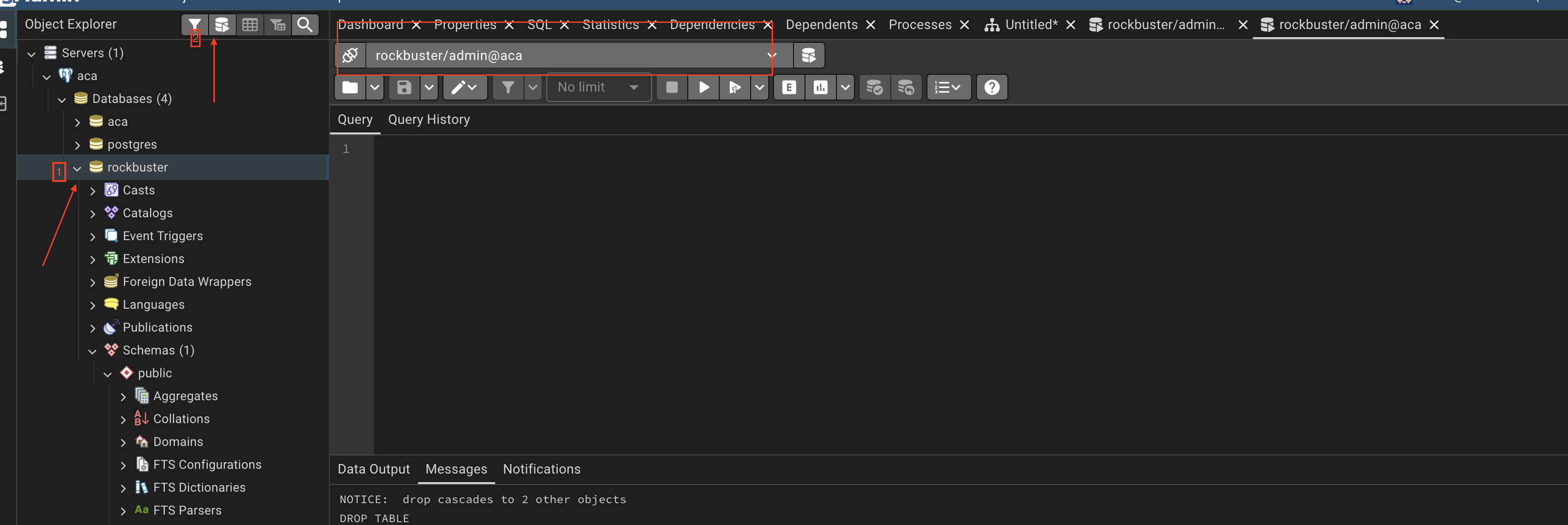
Once you’re in the rockbuster query tool, start creating the schema:
CREATE SCHEMA analyticsCreating the Table analytics._stg_rockbuster
DROP TABLE IF EXISTS analytics._stg_rockbuster;

CREATE TABLE analytics._stg_rockbuster (
    rental_date           timestamp,
    return_date           timestamp,
    amount                numeric(5,2),
    payment_date          timestamp,

    customer_first_name   varchar(45),
    customer_last_name    varchar(45),
    customer_email        varchar(50),
    customer_active       boolean,
    customer_create_date  date,

    customer_address      varchar(50),
    customer_address2     varchar(50),
    customer_district     varchar(20),
    customer_postal_code  varchar(10),
    customer_phone        varchar(20),

    customer_city         varchar(50),
    customer_country      varchar(50),

    title                 varchar(255),
    description           text,
    release_year          int,
    rental_duration       int,
    rental_rate           numeric(4,2),
    length                int,
    replacement_cost      numeric(5,2),
    rating                varchar(10),
    language_name         varchar(20),

    category_name         varchar(25),

    actor_first_name      varchar(45),
    actor_last_name       varchar(45),

    store_number          int,

    staff_first_name      varchar(45),
    staff_last_name       varchar(45),
    staff_email           varchar(50)
);
Download CSV file
You can download the data from her.e
Place it under:
data/rockbuster/rockbuster_denormalized.csvInserting the Data Into analytics._stg_rockbuster
Once you have donloaded the csv data, lets try to ingest the data into SQL in order to continue the data modeling part
COPY analytics._stg_rockbuster
FROM '/docker-entrypoint-initdb.d/data/rockbuster/rockbuster_denormalized.csv'
CSV HEADER
NULL 'NULL';
Data Modeling
Once we have the flat file in SQL, we begin the logical normalization process.
Q0: What do we have?
We have movie rental transaction data including:
- rental information
- payment information
- customer demographic data
- geographic data
- film metadata
- actor-level exploded rows
The list of columns:
rental_date,return_date,amount,payment_date,customer_first_name,customer_last_name,customer_email,customer_active,customer_create_date,customer_address,customer_address2,customer_district,customer_postal_code,customer_phone,customer_city,customer_country,title,description,release_year,rental_duration,rental_rate,length,replacement_cost,rating,language_name,category_name,actor_first_name,actor_last_name,store_number,staff_first_name,staff_last_name,staff_email
Q1: What does one row represent?
One row represents:
- One rental transaction
- One payment
- One film
- One actor associated with that film
Because actors are stored directly in the row, the dataset is duplicated at the actor level.
Q2: Is this table normalized?
No!
- Customer data repeats
- Film attributes repeat
- Country repeats for each city
- Actor rows duplicate film data
This is a classic denormalized transactional dataset.
Q3: Does customer_email uniquely identify a customer?
Yes, most likely:
customer_email →
customer_first_name,
customer_last_name,
customer_active,
customer_create_date,
customer_address
Therefore, customer attributes must be separated.
Q4: Does customer_city determine customer_country?
Yes: This is a transitive dependency.
city → countryCountry should not be stored in the same table as rental.
Q5: Does title determine film attributes?
Yes: Film should be its own entity.
title →
description,
release_year,
rental_duration,
rental_rate,
length,
replacement_cost,
rating,
language_name
Q6: Is there a many-to-many relationship between films and actors?
Yes:
- One film has multiple actors
- One actor appears in multiple films
Therefore, a bridge table is required.
Exploring the Raw Data
Before designing tables, we inspect duplication.
Total Rows
SELECT
  COUNT(*)
FROM analytics._stg_rockbuster;
\[\downarrow\]
\[80,115\]
Distinct Customers
SELECT
  COUNT(DISTINCT customer_email)
FROM analytics._stg_rockbuster;
\[\downarrow\]
\[599\]
Distinct Films
SELECT
  COUNT(DISTINCT title)
FROM analytics._stg_rockbuster;
\[\downarrow\]
\[955\]
Distinct Actors
SELECT
  COUNT(DISTINCT actor_first_name || actor_last_name)
FROM analytics._stg_rockbuster;
\[\downarrow\]
\[199\]
Q7: What does the difference between total rows and distinct films indicate?
It indicates:
- Film data is repeated multiple times
- Actor explosion causes duplication
- The table mixes multiple entity types
STEP 3: Logical Entity Derivation
- Country
- City
- Address
- Customer
- Language
- Film
- Category
- Actor
- Store
- Staff
- Rental
- Payment
Q8: Why do we not immediately create tables?
Because normalization starts with reasoning about dependencies, not writing SQL.
Database design is a logical process first, technical process second.
Deriving the Normalized Schema
Now that we have logically identified the entities, we begin implementing the normalization process in SQL.
We will move from stable dimensions to transactional tables.
Geography Hierarchy
Q9: Why start with geography? A9: This avoids transitive dependency inside customer:
- city \(\rightarrow\) country
- address \(\rightarrow\) city
This avoids transitive dependency inside customer.
add postgis extention
DROP EXTENSION IF EXISTS postgis CASCADE;
CREATE EXTENSION postgis;
SELECT PostGIS_Version();
\[\downarrow\]
this should return: 3.4 USE_GEOS=1 USE_PROJ=1 USE_STATS=1
Country
Create country Table
DROP TABLE IF EXISTS analytics.country CASCADE;

CREATE TABLE analytics.country (
    country_id SERIAL PRIMARY KEY, --autoincrement
    country_name VARCHAR(50) UNIQUE NOT NULL,
    -- geometry
);
Insert Into country Table
INSERT INTO analytics.country (country_name)
SELECT
  DISTINCT
  a.customer_country,
  b.geometry
FROM analytics._stg_rockbuster a
LEFT JOIN analytics._stg_countries b on (a.country_name=b.country_name)
WHERE customer_country IS NOT NULL;
Country Bounderies
Before running this, make sure to have in your data folder the country geojson, which you can download from here.
Create _stg_world_countries Table
CREATE TABLE analytics._stg_world_countries (
    country_name TEXT NOT NULL,
    country_code TEXT NOT NULL,
    geom geometry(MULTIPOLYGON, 4326) NOT NULL
);
Insert Into _stg_world_countries Table
INSERT INTO analytics._stg_world_countries (country_name, country_code, geom)
SELECT
    feature->'properties'->>'name' AS country_name,
    feature->>'id' AS country_code,
    ST_SetSRID(
        ST_Multi(
            ST_CollectionExtract(
                ST_Force2D(
                    ST_MakeValid(
                        ST_GeomFromGeoJSON(feature->>'geometry')
                    )
                ),
            3)
        ),
        4326
    ) AS geom
FROM (
    SELECT jsonb_array_elements(data->'features') AS feature
    FROM (
        SELECT pg_read_file('/docker-entrypoint-initdb.d/data/rockbuster/countries.geo.json')::jsonb AS data
    ) f
) sub;
View _stg_world_countries Table
SELECT
    *
FROM analytics._stg_world_countries
LIMIT 10
City
Create city Table
DROP TABLE IF EXISTS analytics.city CASCADE;

CREATE TABLE analytics.city (
    city_id SERIAL PRIMARY KEY,
    city_name VARCHAR(50) NOT NULL,
    country_id INT REFERENCES analytics.country(country_id),
    UNIQUE (city_name, country_id)
);
Insert Into city Table
INSERT INTO analytics.city (city_name, country_id)
SELECT DISTINCT
    s.customer_city,
    c.country_id
FROM analytics._stg_rockbuster s
JOIN analytics.country c
  ON c.country_name = s.customer_country;
View city Table
SELECT
    *
FROM analytics.city
LIMIT 10
Address
Create address Table
DROP TABLE IF EXISTS analytics.address CASCADE;

CREATE TABLE analytics.address (
    address_id SERIAL PRIMARY KEY,
    address VARCHAR(50),
    address2 VARCHAR(50),
    district VARCHAR(20),
    postal_code VARCHAR(10),
    phone VARCHAR(20),
    city_id INT REFERENCES analytics.city(city_id),
    UNIQUE(address, postal_code, city_id)
);
Insert Into address Table
INSERT INTO analytics.address (
    address,
    address2,
    district,
    postal_code,
    phone,
    city_id
)
SELECT DISTINCT
    s.customer_address,
    s.customer_address2,
    s.customer_district,
    s.customer_postal_code,
    s.customer_phone,
    c.city_id
FROM analytics._stg_rockbuster s
JOIN analytics.city c
  ON c.city_name = s.customer_city;
View address Table
SELECT
    *
FROM analytics.address
LIMIT 10
Customer Entity
Q10: What uniquely identifies a customer?
A1: customer_email (natural key assumption for this exercise).
Create customer Table
DROP TABLE IF EXISTS analytics.customer CASCADE;

CREATE TABLE analytics.customer (
    customer_id SERIAL PRIMARY KEY,
    first_name VARCHAR(45),
    last_name VARCHAR(45),
    email VARCHAR(50) UNIQUE,
    active BOOLEAN,
    create_date DATE,
    address_id INT REFERENCES analytics.address(address_id)
);
Insert Into customer Table
INSERT INTO analytics.customer (
    first_name,
    last_name,
    email,
    active,
    create_date,
    address_id
)
SELECT DISTINCT
    s.customer_first_name,
    s.customer_last_name,
    s.customer_email,
    s.customer_active,
    s.customer_create_date,
    a.address_id
FROM analytics._stg_rockbuster s
JOIN analytics.address a
  ON a.address = s.customer_address;
View customer Table
SELECT
    *
FROM analytics.customer
LIMIT 10
Language
Q11: What determines film attributes?
A11: title determines all film-related descriptive attributes.
- Language
Create language Table
DROP TABLE IF EXISTS analytics.language CASCADE;

CREATE TABLE analytics.language (
    language_id SERIAL PRIMARY KEY,
    language_name VARCHAR(20) UNIQUE
);
Insert Into language Table
INSERT INTO analytics.language (language_name)
SELECT DISTINCT language_name
FROM analytics._stg_rockbuster;
View language Table
SELECT
    *
FROM analytics.language
LIMIT 10
Film
Create film Table
DROP TABLE IF EXISTS analytics.film CASCADE;

CREATE TABLE analytics.film (
    film_id SERIAL PRIMARY KEY,
    title VARCHAR(255),
    description TEXT,
    release_year INT,
    rental_duration INT,
    rental_rate NUMERIC(4,2),
    length INT,
    replacement_cost NUMERIC(5,2),
    rating VARCHAR(10),
    language_id INT REFERENCES analytics.language(language_id),
    UNIQUE(title, release_year)
);
Insert Into film Table
INSERT INTO analytics.film (
    title,
    description,
    release_year,
    rental_duration,
    rental_rate,
    length,
    replacement_cost,
    rating,
    language_id
)
SELECT DISTINCT
    s.title,
    s.description,
    s.release_year,
    s.rental_duration,
    s.rental_rate,
    s.length,
    s.replacement_cost,
    s.rating,
    l.language_id
FROM analytics._stg_rockbuster s
JOIN analytics.language l
  ON l.language_name = s.language_name;
View film Table
SELECT
    *
FROM analytics.film
LIMIT 10
Category
Create category Table
DROP TABLE IF EXISTS analytics.category CASCADE;

CREATE TABLE analytics.category (
    category_id SERIAL PRIMARY KEY,
    category_name VARCHAR(25) UNIQUE
);
Insert Into category Table
INSERT INTO analytics.category (category_name)
SELECT DISTINCT category_name
FROM analytics._stg_rockbuster;
View category Table
SELECT
    *
FROM analytics.category
LIMIT 10
Actor
Create actor Table
DROP TABLE IF EXISTS analytics.actor CASCADE;

CREATE TABLE analytics.actor (
    actor_id SERIAL PRIMARY KEY,
    first_name VARCHAR(45),
    last_name VARCHAR(45),
    UNIQUE(first_name, last_name)
);
Insert Into actor Table
INSERT INTO analytics.actor (first_name, last_name)
SELECT DISTINCT
    actor_first_name,
    actor_last_name
FROM analytics._stg_rockbuster;
View actor Table
SELECT
    *
FROM analytics.actor
LIMIT 10
Film Category Bridge
Create film_category Table
Many-to-Many Relationships Film-Category Bridge
DROP TABLE IF EXISTS analytics.film_category;

CREATE TABLE analytics.film_category (
    film_id INT REFERENCES analytics.film(film_id),
    category_id INT REFERENCES analytics.category(category_id),
    PRIMARY KEY (film_id, category_id)
);
Insert Into film_category Table
INSERT INTO analytics.film_category
SELECT DISTINCT
    f.film_id,
    c.category_id
FROM analytics._stg_rockbuster s
JOIN analytics.film f
  ON f.title = s.title
JOIN analytics.category c
  ON c.category_name = s.category_name;
View film_category Table
SELECT
    *
FROM analytics.film_category
LIMIT 10
Film Actor Bridge
Create film_actor Table
DROP TABLE IF EXISTS analytics.film_actor;

CREATE TABLE analytics.film_actor (
    film_id INT REFERENCES analytics.film(film_id),
    actor_id INT REFERENCES analytics.actor(actor_id),
    PRIMARY KEY (film_id, actor_id)
);
Insert Into film_actor Table
INSERT INTO analytics.film_actor
SELECT DISTINCT
    f.film_id,
    a.actor_id
FROM analytics._stg_rockbuster s
JOIN analytics.film f
  ON f.title = s.title
JOIN analytics.actor a
  ON a.first_name = s.actor_first_name
 AND a.last_name  = s.actor_last_name;
View film_actor Table
SELECT
    *
FROM analytics.film_actor
LIMIT 10
Store
Create store Table
DROP TABLE IF EXISTS analytics.store CASCADE;

CREATE TABLE analytics.store (
    store_id SERIAL PRIMARY KEY,
    store_number INT UNIQUE
);
Insert Into store Table
INSERT INTO analytics.store (store_number)
SELECT DISTINCT store_number
FROM analytics._stg_rockbuster;
View store Table
SELECT
    *
FROM analytics.store
LIMIT 10
Staff
Create staff Table
DROP TABLE IF EXISTS analytics.staff CASCADE;

CREATE TABLE analytics.staff (
    staff_id SERIAL PRIMARY KEY,
    first_name VARCHAR(45),
    last_name VARCHAR(45),
    email VARCHAR(50),
    store_id INT REFERENCES analytics.store(store_id)
);
Insert Into staff Table
INSERT INTO analytics.staff (
    first_name,
    last_name,
    email,
    store_id
)
SELECT DISTINCT
    s.staff_first_name,
    s.staff_last_name,
    s.staff_email,
    st.store_id
FROM analytics._stg_rockbuster s
JOIN analytics.store st
  ON st.store_number = s.store_number;
View staff Table
SELECT
    *
FROM analytics.staff
LIMIT 10
Rental
Create rental Table
DROP TABLE IF EXISTS analytics.rental CASCADE;

CREATE TABLE analytics.rental (
    rental_id SERIAL PRIMARY KEY,
    rental_date TIMESTAMP,
    return_date TIMESTAMP,
    customer_id INT REFERENCES analytics.customer(customer_id),
    film_id INT REFERENCES analytics.film(film_id),
    staff_id INT REFERENCES analytics.staff(staff_id)
);
Insert Into rental Table
INSERT INTO analytics.rental (
    rental_date,
    return_date,
    customer_id,
    film_id,
    staff_id
)
SELECT DISTINCT
    s.rental_date,
    s.return_date,
    c.customer_id,
    f.film_id,
    st.staff_id
FROM analytics._stg_rockbuster s
JOIN analytics.customer c ON c.email = s.customer_email
JOIN analytics.film f ON f.title = s.title
JOIN analytics.staff st ON st.email = s.staff_email;
View rental Table
SELECT
    *
FROM analytics.rental
LIMIT 10
Payment
Create payment Table
Insert Into payment Table
View payment Table
SELECT
    *
FROM analytics.payment
LIMIT 10
Payment
Create payment Table
DROP TABLE IF EXISTS analytics.payment CASCADE;

CREATE TABLE analytics.payment (
    payment_id SERIAL PRIMARY KEY,
    rental_id INT REFERENCES analytics.rental(rental_id),
    amount NUMERIC(5,2),
    payment_date TIMESTAMP
);
Insert Into payment Table
INSERT INTO analytics.payment (
    rental_id,
    amount,
    payment_date
)
SELECT DISTINCT
    r.rental_id,
    s.amount,
    s.payment_date
FROM analytics._stg_rockbuster s
JOIN analytics.rental r
  ON r.rental_date = s.rental_date;
View payment Table
SELECT
    *
FROM analytics.payment
LIMIT 10
Final Checks
SELECT COUNT(*) FROM analytics.customer;
SELECT COUNT(*) FROM analytics.film;
SELECT COUNT(*) FROM analytics.actor;
SELECT COUNT(*) FROM analytics.rental;
SELECT COUNT(*) FROM analytics.payment;
Reflection
Q12: What normalization level did we reach?
A12:
- 1NF \(\rightarrow\) Atomic attributes
- 2NF \(\rightarrow\) No partial dependencies
- 3NF \(\rightarrow\) No transitive dependencies
We have successfully derived a normalized relational schema directly from a flat CSV dataset.
ERD
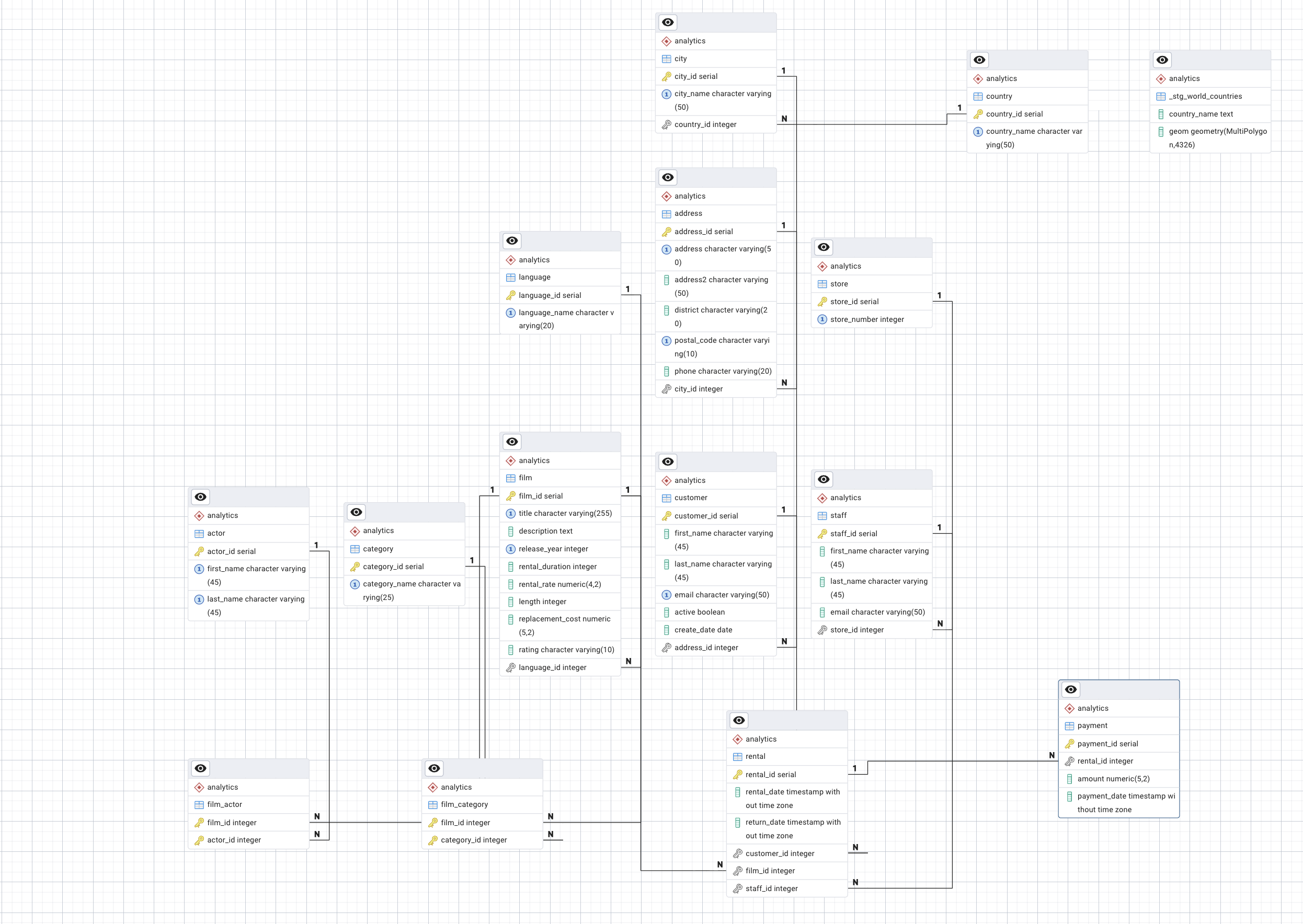
What is the general statistical summary of movie rental conditions?
SELECT
    COUNT(DISTINCT r.rental_id) AS total_rentals,
    SUM(p.amount) AS total_revenue,
    AVG(p.amount) AS avg_payment,
    MIN(p.amount) AS min_payment,
    MAX(p.amount) AS max_payment,
    AVG(EXTRACT(EPOCH FROM (r.return_date - r.rental_date))/86400)  AS avg_rental_days
FROM analytics.rental r
JOIN analytics.payment pON p.rental_id = r.rental_id;
\[\downarrow\]
| Metric | Value |
|---|---|
| Total Rentals | 29,108 |
| Total Revenue | 139,312.68 |
| Average Payment | 4.28 |
| Minimum Payment | 0.00 |
| Maximum Payment | 11.99 |
| Average Rental Duration | 5.03 days |
Interpretation:
- The core pricing likely centers around the 3.99–4.99 range.
- 11.99 suggests penalties or late fees.
- 0.00 likely represents free rentals, promotions, or data anomalies.
Average rental duration: 5.03 days
This suggests:
- Most customers keep movies for approximately 5 days.
- This is slightly above typical 3–4 day rental policies, possibly indicating late returns.
How many customers are there per country?
SELECT
    co.country_name,
    COUNT(c.customer_id) AS total_customers
FROM analytics.customer c
JOIN analytics.address a   ON a.address_id = c.address_id
JOIN analytics.city ci     ON ci.city_id = a.city_id
JOIN analytics.country co  ON co.country_id = ci.country_id
GROUP BY co.country_name
ORDER BY total_customers DESC;
How much revenue does each country generate?
SELECT
    co.country_name,
    SUM(p.amount) AS total_revenue,
    COUNT(DISTINCT c.customer_id) AS total_customers
FROM analytics.payment p
JOIN analytics.rental r     ON r.rental_id = p.rental_id
JOIN analytics.customer c   ON c.customer_id = r.customer_id
JOIN analytics.address a    ON a.address_id = c.address_id
JOIN analytics.city ci      ON ci.city_id = a.city_id
JOIN analytics.country co   ON co.country_id = ci.country_id
GROUP BY co.country_name
ORDER BY total_revenue DESC;
How much revenue does each country generate?
SELECT
    co.country_name,
    SUM(p.amount) AS total_revenue,
    COUNT(DISTINCT c.customer_id) AS total_customers
FROM analytics.payment p
JOIN analytics.rental r     ON r.rental_id = p.rental_id
JOIN analytics.customer c   ON c.customer_id = r.customer_id
JOIN analytics.address a    ON a.address_id = c.address_id
JOIN analytics.city ci      ON ci.city_id = a.city_id
JOIN analytics.country co   ON co.country_id = ci.country_id
GROUP BY co.country_name
ORDER BY total_revenue DESC;
What is the average revenue per customer by country?
SELECT
    co.country_name,
    SUM(p.amount) / COUNT(DISTINCT c.customer_id) AS avg_revenue_per_customer
FROM analytics.payment p
JOIN analytics.rental r     ON r.rental_id = p.rental_id
JOIN analytics.customer c   ON c.customer_id = r.customer_id
JOIN analytics.address a    ON a.address_id = c.address_id
JOIN analytics.city ci      ON ci.city_id = a.city_id
JOIN analytics.country co   ON co.country_id = ci.country_id
GROUP BY co.country_name
ORDER BY avg_revenue_per_customer DESC;