Data Analytics Bootcamp
  • Syllabus
  • Statistical Thinking
  • SQL
  • Python
  • Tableau
  • Lab
  • Capstone
  1. Python
  2. Python
  3. Session 12: Simple Linear Regression and Forecasting
  • Syllabus
  • Statistical Thinking
    • Statistics
      • Statistics Session 01: Data Layers and Bias in Data
      • Statistics Session 02: Data Types
      • Statistics Session 03: Probabilistic Distributions
      • Statistics Session 04: Probabilistic Distributions
      • Statistics Session 05: Sampling
      • Statistics Session 06: Inferential Statistics
      • Slides
        • Course Intro
        • Descriptive Stats
        • Data Types
        • Continuous Distributions
        • Discrete Distributions
        • Sampling
        • Hypothesis Testing
  • SQL
    • SQL
      • Session 01: Intro to Relational Databases
      • Session 02: Intro to PostgreSQL
      • Session 03: DA with SQL | Data Types & Constraints
      • Session 04: DA with SQL | Filtering
      • Session 05: DA with SQL | Numeric Functions
      • Session 06: DA with SQL | String Functions
      • Session 07: DA with SQL | Date Functions
      • Session 08: DA with SQL | JOINs
      • Session 09: DA with SQL | Advanced SQL
      • Session 10: DA with SQL | Advanced SQL Functions
      • Session 11: DA with SQL | UDFs, Stored Procedures
      • Session 12: DA with SQL | Advanced Aggregations
      • Session 13: DA with SQL | Final Project
      • Slides
        • Intro to Relational Databases
        • Intro to PostgreSQL
        • Basic Queries: DDL DLM
        • Filtering
        • Numeric Functions
        • String Functions
        • Date Functions
        • Normalization and JOINs
        • Temporary Tables
        • Advanced SQL Functions
        • Reporting and Analysis with SQL
        • Advanced Aggregations
  • Python
    • Python
      • Session 01: Programming for Data Analysts
      • Session 02: Python basic Syntax, Data Structures
      • Session 03: Introduction to Pandas
      • Session 04: Advanced Pandas
      • Session 05: Intro to Data Visualization
      • Session 06: Data Visualization
      • Session 07: Working with Dates
      • Session 08: Data Visualization | Plotly
      • Session 09: Customer Segmentation | RFM
      • Session 10: A/B Testing
      • Session 11: Cohort Analysis
      • Session 12: Simple Linear Regression and Forecasting
      • Slides
        • Data Analyst
  • Tableau
    • Tableau
      • Tableau Session 01: Introduction to Tableau
      • Tableau Session 02: Intermediate Visual Analytics
      • Tableau Session 03: Advanced Analytics
      • Tableau Session 04: Dashboard Design & Performance
      • Slides
        • Data Analyst
        • Data Analyst
        • Data Analyst
        • Data Analyst

On this page

  • Overview
  • Learning Objectives
  • Intuition of Relationships
    • Visual Thinking
    • Linear Model
    • Interpretation
  • Manual Linear Regression
    • Optimization Problem
    • Coefficient Formula
    • Step-by-Step Example
    • Python | Manual Calculation
    • Predicting next step
  • Regression in Python scikit-learn
    • Installing Scikit Learn package
    • Importing LinearRegression
    • Visualization
  • R-Squared (Model Quality)
    • Python
    • Interpretation
  • Business Applications
    • Example 1 | Marketing Spend → Sales
    • Example 2 | Price → Demand
    • Example 3 | Customer Age → Revenue
  • From Regression to Time Series
    • Key Difference
    • Time Series Components
    • Example Dataset
  • Trend Analysis (Regression on Time)
    • Idea
    • Python Example
  • ARIMA (Applied View)
    • ARIMA Concept
    • Python Example
    • Business Use Case
  • Prophet
    • Python Example
    • Visualization
  • Analytics Use Cases
    • 1. Sales Forecasting
    • 2. Marketing Trend Analysis
    • 3. User Growth
    • 4. Telecom Example
  1. Python
  2. Python
  3. Session 12: Simple Linear Regression and Forecasting

Session 12: Simple Linear Regression and Forecasting

Simple Linear Regression

Overview

This module introduces one of the most important concepts in data analytics: understanding relationships and forecasting trends.

We will go from:

  • Intuition \(\rightarrow\) how relationships work
  • Manual calculations \(\rightarrow\) how models are built
  • Python implementation \(\rightarrow\) how analysts actually use it
  • Business applications \(\rightarrow\) how decisions are made
  • Time series forecasting \(\rightarrow\) how to predict the future

Learning Objectives

After this session, students will be able to:

  • Understand what linear regression is conceptually
  • Manually compute regression coefficients
  • Interpret regression outputs in a business context
  • Build regression models in Python
  • Apply regression for trend analysis
  • Understand time series structure
  • Perform basic forecasting using ARIMA and Prophet

Intuition of Relationships

In analytics, we often ask: “If X changes \(\rightarrow\) what happens to Y?”

Examples:

  • Marketing spend \(\rightarrow\) Sales
  • Price \(\rightarrow\) Demand
  • Discount \(\rightarrow\) Conversion rate
  • Hours studied \(\rightarrow\) Exam score

Visual Thinking

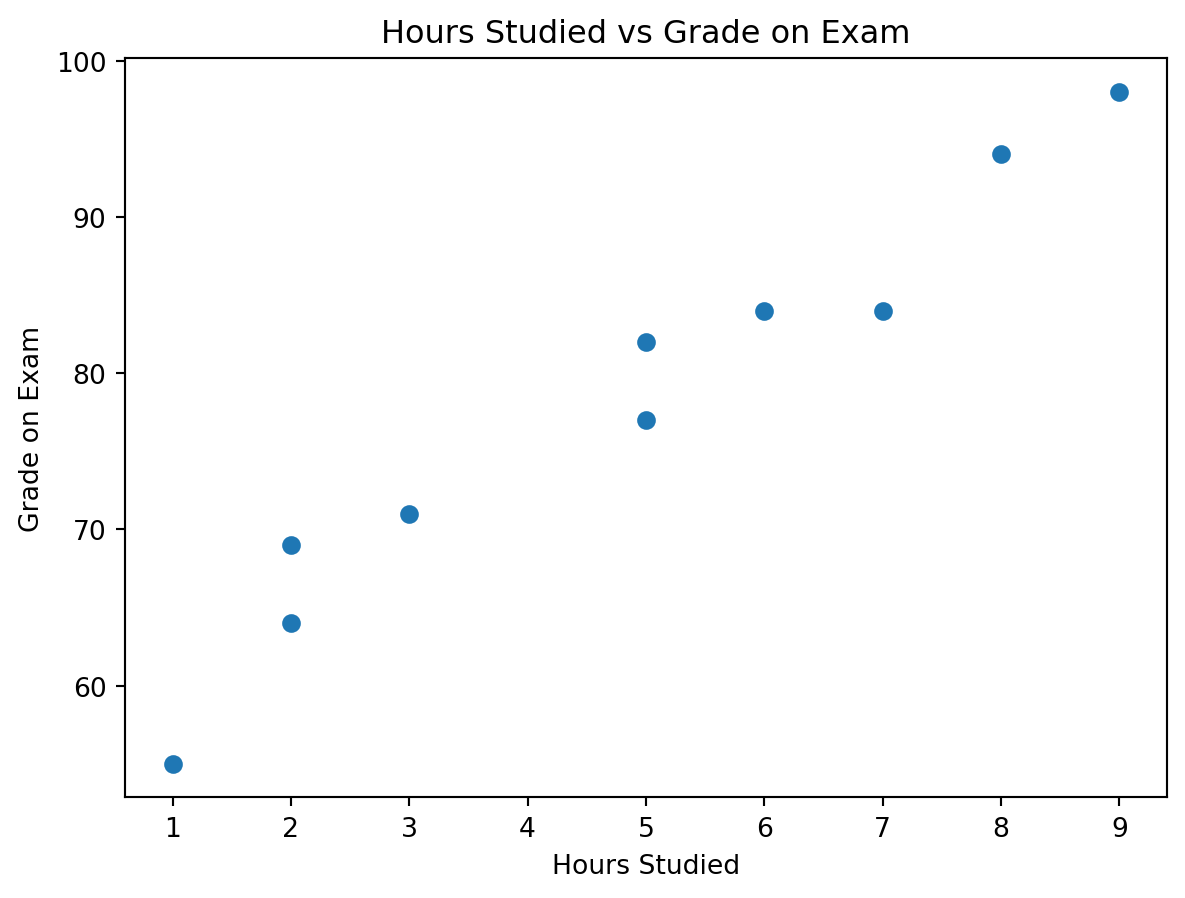
We will use the hours studied vs grade example from the picture you provided.

Hours Studied Grade on Exam
2 69
9 98
5 82
5 77
3 71
7 84
1 55
8 94
6 84
2 64

We observe:

  • As hours studied increase, exam grades also tend to increase
  • The relationship is positive
  • The data does not fall perfectly on one line, which is normal in real life
  • This makes the example ideal for introducing both intuition and model evaluation

Suggested use of the picture you shared:

Keep the screenshot as the raw real-world input at the start of this section, then place the clean table and the scatter plot right after it. It works especially well here because students can visually understand the pattern before seeing any formulas.

Linear Model

The prediction equation for a simple linear regression is:

\[ \hat{Y} = \beta_0 + \beta_1 X \]

A more complete statistical view is:

\[ Y = \beta_0 + \beta_1 X + \varepsilon \]

Where:

  • \(Y\) is the actual observed outcome
  • \(\hat{Y}\) is the predicted outcome
  • \(X\) is the input variable
  • \(\beta_0\) is the intercept
  • \(\beta_1\) is the slope
  • \(\varepsilon\) is the part of the outcome the model does not explain

In this lesson:

  • \(X\) = hours studied
  • \(Y\) = grade on exam

Interpretation

  • \(\beta_1\) tells us how much \(Y\) changes when \(X\) increases by 1 unit
  • \(\beta_0\) tells us the predicted value of \(Y\) when \(X = 0\)

Example:

  • If \(\beta_1 = 5\), then each extra hour studied is associated with about 5 extra grade points
  • If \(\beta_0 = 55\), then the model predicts a grade of 55 for a student who studied 0 hours

Manual Linear Regression

Our goal Find the best line that fits the data.

Optimization Problem

We minimize:

\[ \sum (y_i - \hat{y}_i)^2 \]

This is called Least Squares.

To understand it:

  • \(y_i\) is the actual value
  • \(\hat{y}_i\) is the predicted value
  • \((y_i - \hat{y}_i)\) is the residual, or prediction error
  • Squaring makes all errors positive and penalizes larger errors more strongly

So the model is searching for the line that leaves the smallest total squared error.

Coefficient Formula

Slope:

\[ \beta_1 = \frac{\sum (x_i - \bar{x})(y_i - \bar{y})}{\sum (x_i - \bar{x})^2} \]

Intercept:

\[ \beta_0 = \bar{y} - \beta_1 \bar{x} \]

Step-by-Step Example

We will use the same hours-studied dataset from the picture.

Step 1: Compute the means

\[ \bar{x} = 4.8 \qquad \bar{y} = 77.8 \]

Step 2: Compute the numerator and denominator for the slope

\[ \sum (x_i - \bar{x})(y_i - \bar{y}) = 320.6 \]

\[ \sum (x_i - \bar{x})^2 = 67.6 \]

Step 3: Compute the slope

\[ \beta_1 = \frac{320.6}{67.6} \approx 4.7426 \]

Step 4: Compute the intercept

\[ \beta_0 = 77.8 - (4.7426 \times 4.8) \approx 55.0355 \]

So the fitted line is:

\[ \hat{Y} = 55.04 + 4.74X \]

This means:

  • the baseline predicted grade is about 55.04
  • each extra study hour adds about 4.74 grade points

Python | Manual Calculation

x = hours
y = grades

x_mean = x.mean()
y_mean = y.mean()

beta1 = ((x - x_mean) * (y - y_mean)).sum() / ((x - x_mean) ** 2).sum()
beta0 = y_mean - beta1 * x_mean

print(f"Mean of X: {x_mean:.2f}")
print(f"Mean of Y: {y_mean:.2f}")
print(f"Intercept (β0): {beta0:.4f}")
print(f"Slope (β1): {beta1:.4f}")
print(f"Fitted line: y_hat = {beta0:.2f} + {beta1:.2f}x")
Mean of X: 4.80
Mean of Y: 77.80
Intercept (β0): 55.0355
Slope (β1): 4.7426
Fitted line: y_hat = 55.04 + 4.74x

Expected interpretation:

  • \(\beta_0 \approx 55.04\)
  • \(\beta_1 \approx 4.74\)

Predicting next step

Now that we have the fitted line, we can predict the grade for a new value of \(X\).

For example, if a student studies for 4 hours:

new_hours = 4
predicted_grade = beta0 + beta1 * new_hours

print(f"Predicted grade for {new_hours} hours: {predicted_grade:.2f}")
Predicted grade for 4 hours: 74.01

Interpretation:

For a student who studied 4 hours, the model predicts a grade of about 74.01.

Regression in Python scikit-learn

Now let us build the same model using scikit-learn.

Installing Scikit Learn package

pip install -U scikit-learn

Importing LinearRegression

from sklearn.linear_model import LinearRegression
X = hours.reshape(-1, 1)
y = grades

hours_model = LinearRegression()
hours_model.fit(X, y)

print(f"Intercept: {hours_model.intercept_:.4f}")
print(f"Slope: {hours_model.coef_[0]:.4f}")
Intercept: 55.0355
Slope: 4.7426

You should see values very close to the manual calculation above.

Visualization

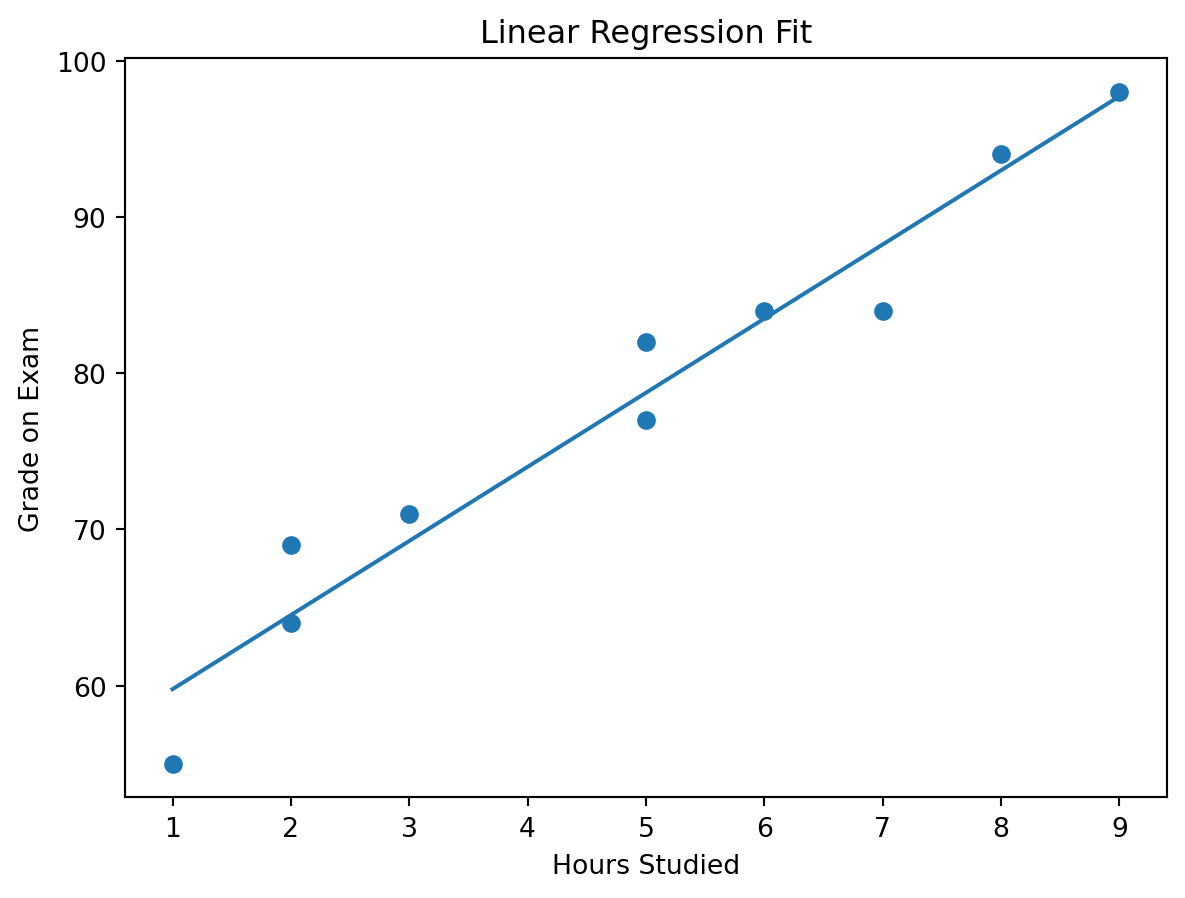
The scatter plot shows the observed data, and the line shows the model’s predicted trend.

R-Squared (Model Quality)

This section is the model evaluation section for the simple regression example.

In practice, we usually want to answer two questions:

  • How much variation does the model explain?
  • How large are the prediction errors?

For that reason, we will compute both:

  • \(R^2\)
  • RMSE

Python

First, compute the predictions and residuals.

y_pred = hours_model.predict(X)
residuals = y - y_pred

ss_res = np.sum(residuals ** 2)
ss_tot = np.sum((y - y.mean()) ** 2)

r2 = 1 - (ss_res / ss_tot)
rmse = np.sqrt(np.mean(residuals ** 2))

print(f"SS_res: {ss_res:.4f}")
print(f"SS_tot: {ss_tot:.4f}")
print(f"R-squared: {r2:.4f}")
print(f"RMSE: {rmse:.4f}")
SS_res: 79.1213
SS_tot: 1599.6000
R-squared: 0.9505
RMSE: 2.8129

For this example, the values are approximately:

  • \(SS_{res} = 79.1213\)
  • \(SS_{tot} = 1599.6000\)
  • \(R^2 = 0.9505\)
  • \(RMSE = 2.8129\)

Manual formula for \(R^2\):

\[ R^2 = 1 - \frac{SS_{res}}{SS_{tot}} \]

Where:

  • \(SS_{res} = \sum (y_i - \hat{y}_i)^2\) → unexplained variation left by the model
  • \(SS_{tot} = \sum (y_i - \bar{y})^2\) → total variation in the target

Manual formula for RMSE:

\[ RMSE = \sqrt{\frac{1}{n}\sum (y_i - \hat{y}_i)^2} \]

RMSE is simply the square root of the average squared residual.

Interpretation

R-Squared

  • \(R^2\) tells us how much of the variation in the target is explained by the model
  • In this example, \(R^2 \approx 0.9505\)

That means:

  • about 95.05% of the variation in exam grades is explained by hours studied
  • about 4.95% is due to other factors the model does not include

Those other factors might include:

  • sleep
  • stress
  • prior knowledge
  • exam difficulty
  • concentration level

RMSE

  • RMSE tells us the typical prediction error size
  • It uses the same unit as the target
  • Here the target is grade points

So:

  • RMSE \(\approx 2.81\)

This means the model’s predictions are off by about 2.81 grade points on average

Why both metrics matter

  • \(R^2\) is useful for understanding explanatory strength
  • RMSE is useful for understanding practical error size
  • A model can have a high \(R^2\) and still have prediction errors that matter in practice

Why your picture is useful here

This is exactly why the hours-studied image should stay in the lesson. The dataset is small enough that students can:

  • compute the fitted line by hand
  • compute the residuals by hand
  • compute \(R^2\) and RMSE by hand
  • understand what “good fit” really means

Business Applications

Example 1 | Marketing Spend → Sales

Now we move from a classroom-style example to a more business-oriented dataset.

Here we have advertising data with:

  • tv
  • radio
  • social_media
  • influencer
  • sales
import pandas as pd

path = '../../lab/python/data/regression/advertising_and_sales.csv'
ads = pd.read_csv(path)
ads
tv radio social_media influencer sales
0 16000.0 6566.23 2907.98 Mega 54732.76
1 13000.0 9237.76 2409.57 Mega 46677.90
2 41000.0 15886.45 2913.41 Mega 150177.83
3 83000.0 30020.03 6922.30 Mega 298246.34
4 15000.0 8437.41 1406.00 Micro 56594.18
... ... ... ... ... ...
4541 26000.0 4472.36 717.09 Micro 94685.87
4542 71000.0 20610.69 6545.57 Nano 249101.92
4543 44000.0 19800.07 5096.19 Micro 163631.46
4544 71000.0 17534.64 1940.87 Macro 253610.41
4545 42000.0 15966.69 5046.55 Micro 148202.41

4546 rows × 5 columns

ImportantUse case
  • Forecast sales
  • Allocate marketing budget
  • Compare channels
  • Introduce multiple regression with a categorical feature

Try each channel separately

We begin with a separate simple regression for each numeric channel.

channel_results = []

for channel in ["tv", "radio", "social_media"]:
    X_channel = ads[[channel]]
    y_sales = ads["sales"]

    channel_model = LinearRegression()
    channel_model.fit(X_channel, y_sales)

    y_hat = channel_model.predict(X_channel)

    r2_channel = 1 - np.sum((y_sales - y_hat) ** 2) / np.sum((y_sales - y_sales.mean()) ** 2)
    rmse_channel = np.sqrt(np.mean((y_sales - y_hat) ** 2))

    channel_results.append({
        "channel": channel,
        "intercept": channel_model.intercept_,
        "slope": channel_model.coef_[0],
        "r_squared": r2_channel,
        "rmse": rmse_channel
    })

pd.DataFrame(channel_results).round(4)
channel intercept slope r_squared rmse
0 tv -132.4925 3.5615 0.9990 2948.5897
1 radio 40586.8007 8.3616 0.7545 46081.4060
2 social_media 118672.5717 22.1879 0.2782 79019.9030

Interpretation of the channel-by-channel models:

  • TV \(\rightarrow\) Sales
    • slope \(\approx 3.5805\)
    • \(R^2 \approx 0.9991\)
    • RMSE \(\approx 2535.84\)
    • TV is the strongest single-channel predictor in this sample
  • Radio \(\rightarrow\) Sales
    • slope \(\approx 9.2207\)
    • \(R^2 \approx 0.8829\)
    • RMSE \(\approx 29007.62\)
    • Radio alone still shows a positive relationship with sales
  • Social Media \(\rightarrow\) Sales
    • slope \(\approx 40.1691\)
    • \(R^2 \approx 0.8192\)
    • RMSE \(\approx 36036.68\)
    • Social media alone is also positively associated with sales

Important note:

Do not compare slope sizes blindly across channels, because the channels are on different scales. A slope of 40 for social media does not automatically mean social media is “better” than TV. The unit sizes differ, and the variables also move together.

Check how strongly the channels move together

ads[["tv", "radio", "social_media", "sales"]].corr().round(3)
tv radio social_media sales
tv 1.000 0.869 0.528 0.999
radio 0.869 1.000 0.606 0.869
social_media 0.528 0.606 1.000 0.527
sales 0.999 0.869 0.527 1.000

You should notice that the spend variables are strongly correlated with one another.

Multiple regression using all numeric channels

Now let us include all three spend channels in the same model.

X_multi_num = ads[["tv", "radio", "social_media"]]
y_sales = ads["sales"]

multi_num_model = LinearRegression()
multi_num_model.fit(X_multi_num, y_sales)

y_hat_multi_num = multi_num_model.predict(X_multi_num)

multi_num_results = pd.DataFrame({
    "feature": ["intercept"] + list(X_multi_num.columns),
    "coefficient": [multi_num_model.intercept_] + list(multi_num_model.coef_)
}).round(4)

multi_num_r2 = 1 - np.sum((y_sales - y_hat_multi_num) ** 2) / np.sum((y_sales - y_sales.mean()) ** 2)
multi_num_rmse = np.sqrt(np.mean((y_sales - y_hat_multi_num) ** 2))

multi_num_results
print(f"R-squared: {multi_num_r2:.4f}")
print(f"RMSE: {multi_num_rmse:.2f}")
R-squared: 0.9990
RMSE: 2948.54

Interpretation:

The fitted numeric-only multiple regression is approximately:

\[ \hat{Sales} = 1040.43 + 3.67(TV) - 0.06(Radio) - 0.94(SocialMedia) \]

And the model fit is:

  • \(R^2 \approx 0.9992\)
  • RMSE \(\approx 2428.32\)

What does this mean?

  • Holding the other channels constant, TV remains strongly positive
  • Radio and social media become slightly negative in this sample
  • That does not automatically mean radio or social media are harmful
  • More likely, the predictors are overlapping so strongly that the model struggles to separate their unique contributions cleanly

This is a classic multiple-regression interpretation issue: a variable can look positive in a simple regression and unstable in a multiple regression when predictors are highly correlated.

Multiple regression with the influencer variable

influencer is categorical, so we need dummy variables.

We will make Mega the reference category.

ads["influencer"] = pd.Categorical(
    ads["influencer"],
    categories=["Mega", "Macro", "Micro", "Nano"]
)

X_multi = pd.get_dummies(
    ads[["tv", "radio", "social_media", "influencer"]],
    drop_first=True,
    dtype=int
)

multi_model = LinearRegression()
multi_model.fit(X_multi, y_sales)

y_hat_multi = multi_model.predict(X_multi)

multi_results = pd.DataFrame({
    "feature": ["intercept"] + list(X_multi.columns),
    "coefficient": [multi_model.intercept_] + list(multi_model.coef_)
}).round(4)

multi_r2 = 1 - np.sum((y_sales - y_hat_multi) ** 2) / np.sum((y_sales - y_sales.mean()) ** 2)
multi_rmse = np.sqrt(np.mean((y_sales - y_hat_multi) ** 2))

multi_results
print(f"R-squared: {multi_r2:.4f}")
print(f"RMSE: {multi_rmse:.2f}")
R-squared: 0.9990
RMSE: 2948.31

Interpretation:

The fitted model is approximately:

\[ \hat{Sales} = 21.65 + 3.77(TV) - 0.42(Radio) - 0.38(SocialMedia) - 3562.83(Macro) + 3596.86(Micro) + 1501.38(Nano) \]

Where:

  • Mega is the baseline influencer category
  • Macro, Micro, and Nano are dummy adjustments relative to Mega

Model fit:

  • \(R^2 \approx 0.9994\)
  • RMSE \(\approx 2083.33\)

How to interpret the coefficients:

  • TV = 3.77
    Holding the other variables constant, an extra $1 in TV spend is associated with about $3.77 more sales

  • Radio = -0.42 and Social Media = -0.38
    These slightly negative coefficients should be interpreted very carefully. In this tiny sample, the predictors are highly correlated, so these signs are more likely reflecting multicollinearity and overlap than a real negative business effect

  • Influencer dummies
    These are shifts relative to Mega

    • Macro = -3562.83
    • Micro = +3596.86
    • Nano = +1501.38

Important caution:

Do not over-interpret the influencer coefficients here:

  • Macro appears only once
  • Micro appears twice
  • Nano appears twice
  • Mega appears seven times

So this is a good tutorial example for how to include a categorical variable, but not a strong basis for making real strategic claims.

Example 2 | Price → Demand

For this example, we generate realistic synthetic data with a negative relationship.

np.random.seed(42)

price = np.linspace(10, 100, 40)
demand = 1200 - 8 * price + np.random.normal(0, 35, size=40)

X_price = price.reshape(-1, 1)

price_model = LinearRegression()
price_model.fit(X_price, demand)

demand_pred = price_model.predict(X_price)

price_r2 = 1 - np.sum((demand - demand_pred) ** 2) / np.sum((demand - demand.mean()) ** 2)
price_rmse = np.sqrt(np.mean((demand - demand_pred) ** 2))

print(f"Intercept: {price_model.intercept_:.4f}")
print(f"Slope: {price_model.coef_[0]:.4f}")
print(f"R-squared: {price_r2:.4f}")
print(f"RMSE: {price_rmse:.4f}")
Intercept: 1209.3747
Slope: -8.3096
R-squared: 0.9797
RMSE: 31.8794

Interpretation:

This model produces approximately:

  • intercept \(\approx 1209.37\)
  • slope \(\approx -8.31\)
  • \(R^2 \approx 0.9797\)
  • RMSE \(\approx 31.88\)

Business meaning:

  • each $1 increase in price reduces demand by about 8.31 units
  • the relationship is strong
  • this is exactly the kind of model used in pricing strategy and elasticity-style discussions

Example 3 | Customer Age → Revenue

For this example, we generate realistic synthetic data with a positive relationship.

np.random.seed(7)

age = np.random.randint(18, 66, size=50)
revenue = 18 + 2.4 * age + np.random.normal(0, 12, size=50)

X_age = age.reshape(-1, 1)

age_model = LinearRegression()
age_model.fit(X_age, revenue)

revenue_pred = age_model.predict(X_age)

age_r2 = 1 - np.sum((revenue - revenue_pred) ** 2) / np.sum((revenue - revenue.mean()) ** 2)
age_rmse = np.sqrt(np.mean((revenue - revenue_pred) ** 2))

print(f"Intercept: {age_model.intercept_:.4f}")
print(f"Slope: {age_model.coef_[0]:.4f}")
print(f"R-squared: {age_r2:.4f}")
print(f"RMSE: {age_rmse:.4f}")
Intercept: 18.6013
Slope: 2.3835
R-squared: 0.8834
RMSE: 12.8626

Interpretation:

This model produces approximately:

  • intercept \(\approx 18.60\)
  • slope \(\approx 2.38\)
  • \(R^2 \approx 0.8834\)
  • RMSE \(\approx 12.86\)

Business meaning:

  • each additional year of age is associated with about 2.38 more revenue units
  • this kind of model is useful for segmentation and value analysis
  • it may suggest that different age groups contribute differently to revenue

From Regression to Time Series

Key Difference

Regression Time Series
Observations are treated as independent Observations are ordered in time
Order is not the main issue Order matters
Often explains relationships Often explains and forecasts sequences

In time series analysis, yesterday can influence today, and the sequence itself matters.

Time Series Components

The main components of a time series are:

  • Trend → long-term upward or downward movement
  • Seasonality → repeating pattern
  • Noise → irregular variation

Not every time series contains all three clearly, but this framework helps us reason about the data.

Example Dataset

Data cleaning note:

Amazon stock prices

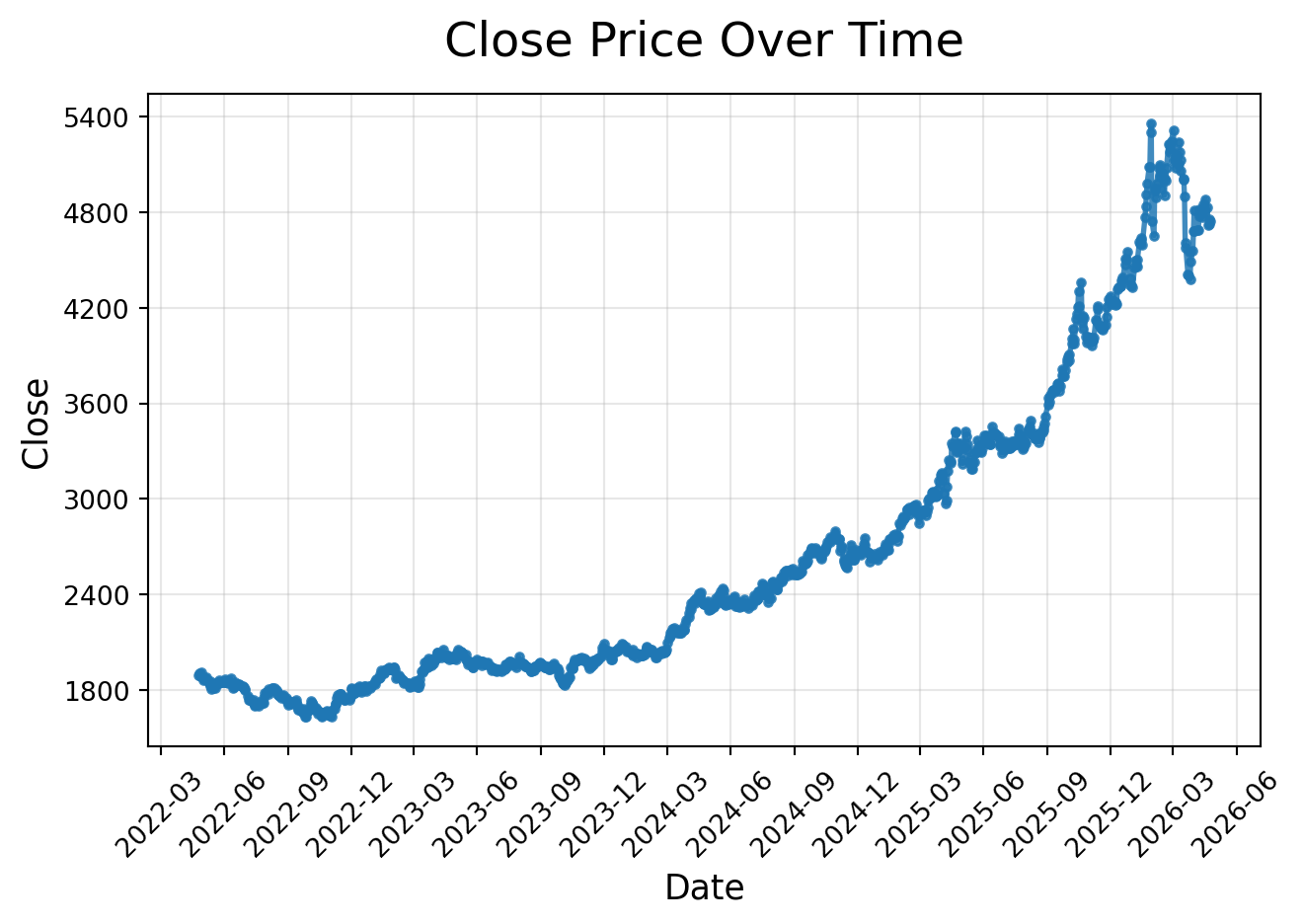
ts = pd.read_csv('../../lab/python/data/regression/time_series/AMZN.csv', parse_dates = ['date'])

The series shows a generally increasing short-run movement, but it is still noisy.

Trend Analysis (Regression on Time)

Idea

Treat time as X:

\[ AdjClose = \beta_0 + \beta_1 \cdot Time \]

This is not yet a full time-series model, but it is a very useful bridge from regression to forecasting.

Python Example

ts["time_index"] = np.arange(1, len(ts) + 1)

X_time = ts[["time_index"]]
y_time = ts["adj_close"]

trend_model = LinearRegression()
trend_model.fit(X_time, y_time)

trend_pred = trend_model.predict(X_time)

trend_r2 = 1 - np.sum((y_time - trend_pred) ** 2) / np.sum((y_time - y_time.mean()) ** 2)
trend_rmse = np.sqrt(np.mean((y_time - trend_pred) ** 2))

print(f"Intercept: {trend_model.intercept_:.4f}")
print(f"Slope: {trend_model.coef_[0]:.4f}")
print(f"R-squared: {trend_r2:.4f}")
print(f"RMSE: {trend_rmse:.4f}")
Intercept: -132.0958
Slope: 0.1188
R-squared: 0.6252
RMSE: 135.1260

Interpretation:

For this short sample:

  • intercept \(\approx 26.1793\)
  • slope \(\approx 0.0665\)
  • \(R^2 \approx 0.7061\)
  • RMSE \(\approx 0.1605\)

Meaning:

  • on average, the adjusted close increases by about 0.0665 per business-day step
  • the upward trend is present, but not all variation is explained by a straight line
  • this is expected, because market prices are noisy and time dependence matters

ARIMA (Applied View)

ARIMA is a classic forecasting model for ordered data.

  • AR → autoregressive part, which uses past values
  • I → integrated part, which applies differencing
  • MA → moving-average part, which uses past forecast errors

In simple terms:

  • ARIMA helps us model time dependence
  • differencing helps stabilize a series when the level changes over time
  • the model can then be used for short-run forecasting

ARIMA Concept

The notation ARIMA(p, d, q) means:

  • p = number of autoregressive lags
  • d = number of differences
  • q = number of moving-average lags

In this lesson we use ARIMA(1, 1, 1) as a practical demonstration model.

Python Example

from statsmodels.tsa.arima.model import ARIMA

ts_arima = ts.set_index("date").asfreq("B")

arima_model = ARIMA(ts_arima["adj_close"], order=(1, 1, 1))
arima_fit = arima_model.fit()

arima_forecast = arima_fit.forecast(steps=3)
arima_forecast
2017-08-03    995.888579
2017-08-04    995.888576
2017-08-07    995.888576
Freq: B, Name: predicted_mean, dtype: float64

For this short dataset, the next 3 business-day forecasts are approximately:

  • 2012-08-23 → 26.6695
  • 2012-08-24 → 26.7292
  • 2012-08-27 → 26.7015
Note

The statsmodels package is often preinstalled in many environments, but if you get ModuleNotFoundError, install it with:

pip install statsmodels

Business Use Case

ARIMA is useful when:

  • the data is sequential
  • recent past behavior helps predict near-future behavior
  • the goal is short-run forecasting

Typical business uses include:

  • monthly sales forecasting
  • inventory planning
  • call center demand forecasting
  • website traffic forecasting
  • short-horizon financial series modeling

Important caution for this example:

Our stock-price snippet is very short, so this ARIMA fit should be treated as a workflow demonstration, not a production forecast.

Prophet

Prophet is a forecasting package for Python and R.

It is popular because:

  • it is easy to use
  • it works naturally with date-based data
  • it can handle trend changes
  • it can model seasonality and holiday effects when enough history is available
  • it provides an intuitive forecasting workflow

For this very short dataset, we use Prophet mainly to demonstrate the workflow correctly.

Python Example

from prophet import Prophet

df_prophet = ts.rename(columns={"date": "ds", "adj_close": "y"})

prophet_model = Prophet()
prophet_model.fit(df_prophet)

future = prophet_model.make_future_dataframe(periods=3, freq="B")
forecast = prophet_model.predict(future)

forecast[["ds", "yhat", "yhat_lower", "yhat_upper"]].tail(3)
ds yhat yhat_lower yhat_upper
5088 2017-08-03 892.973948 843.465529 942.408389
5089 2017-08-04 892.613420 845.514723 938.707613
5090 2017-08-07 892.099414 844.520219 940.545496
Note

If you get ModuleNotFoundError, install Prophet with:

pip install prophet

Visualization

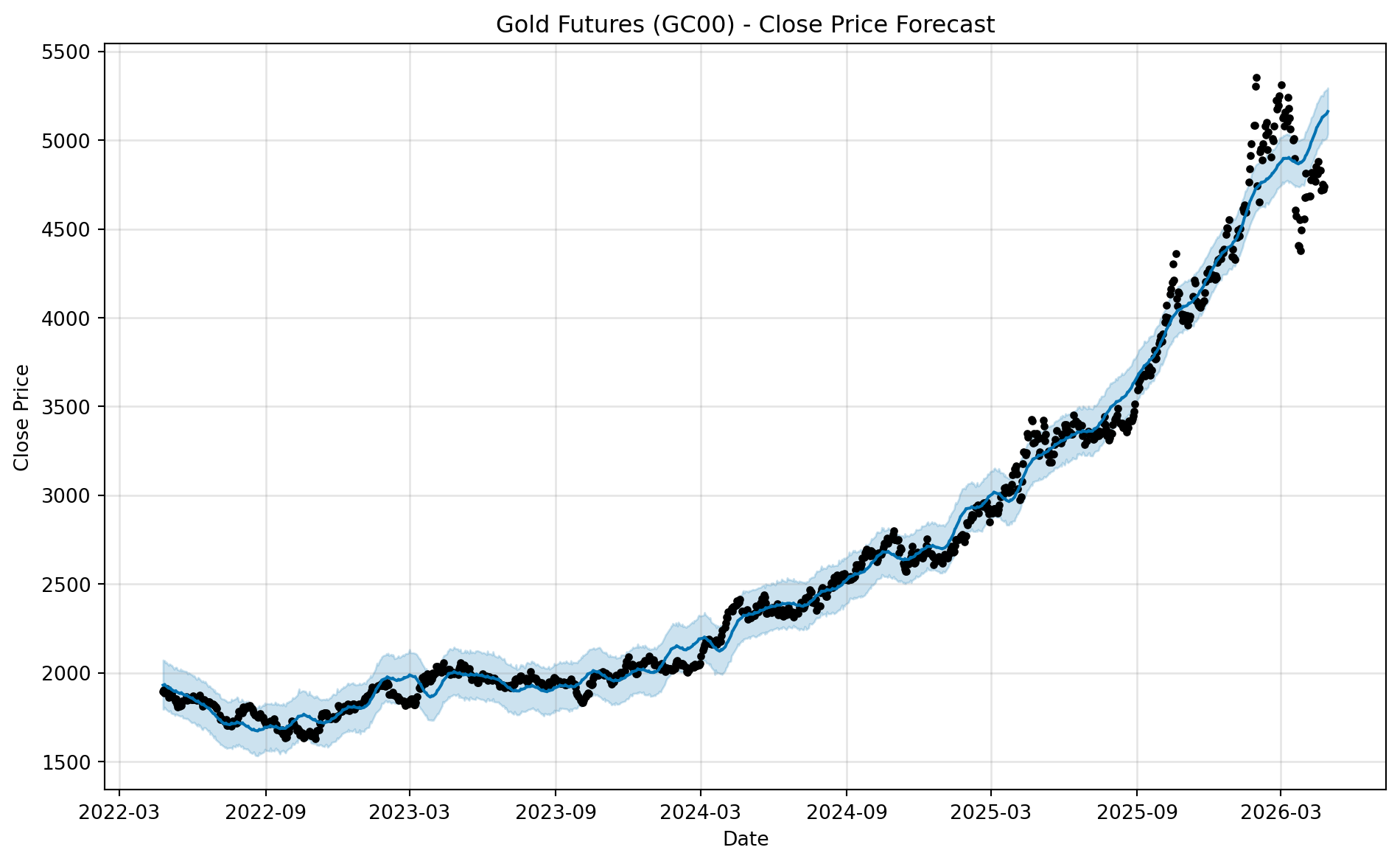
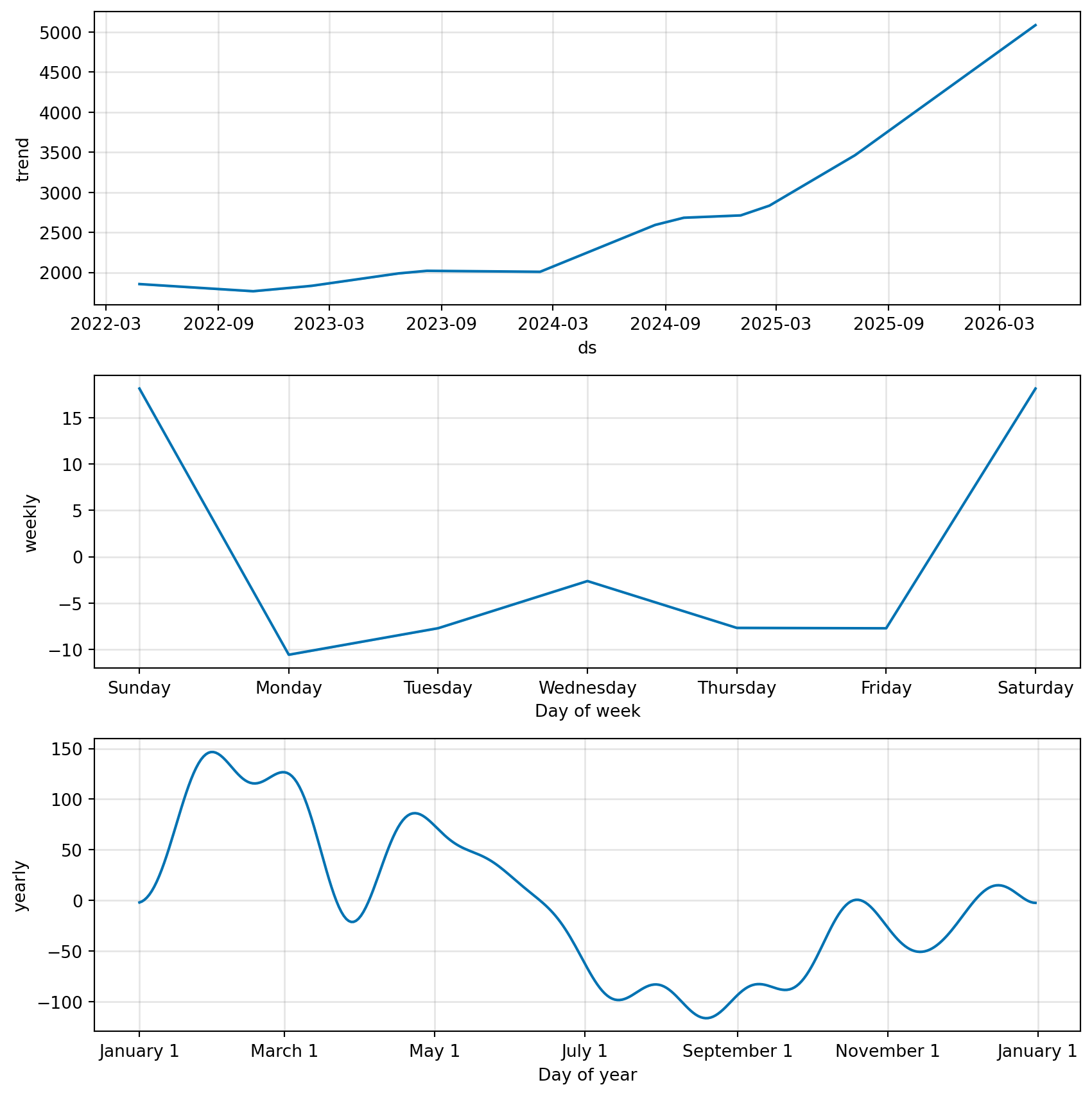
How to read the Prophet output:

  • the main forecast plot shows the historical data, the fitted forecast line, and the uncertainty interval
  • the component plots break the forecast into interpretable pieces such as trend and seasonality
  • with this short business-day sample, the trend is the most useful part to discuss
  • with a longer history, Prophet becomes much more useful for storytelling around trend changes and seasonal patterns

Analytics Use Cases

1. Sales Forecasting

  • Predict future revenue
  • Support budget planning
  • Plan production and inventory
  • Estimate expected business growth

2. Marketing Trend Analysis

  • Measure how marketing spend relates to sales
  • Compare channels one at a time
  • Use multiple regression to estimate joint effects
  • Identify overlap and multicollinearity across channels

3. User Growth

  • Forecast DAU and MAU
  • Estimate signup trends after campaigns
  • Model retention-related patterns over time
  • Support capacity planning for product teams

4. Telecom Example

  • Forecast call volume
  • Predict network load
  • Estimate future complaint or support ticket volume
  • Model churn trends over time
  • Improve staffing and operations planning